|
|
|
|
|
|
| |
|
Review
This is a quick review
About the Program:
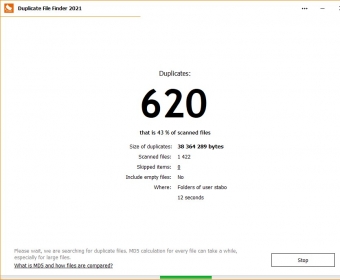
"Duplicate File Finder" is a simple to use program that can search and locate duplicate and empty files in any folder or drive.
It automatically searches all files in all subdirectories.
Duplicate files are based on byte for byte comparisons (100% accurate), for comparing large files you can select "Fast Searching" which compares the first and last 10 megabytes of large files, to increase speed (99% accurate).
This program is great for cleaning up disk space in your picture folders, or documents folders, or download folders.
You can also specify to only search for jpg files or mp3 files, or any other type of specific file type!
WARNING: Do not delete files if you do not know what they are! It is NOT recommended that you search your system directory and delete all the duplicate files it contains; since your operating system may need those files!
Features and Details:
� Multithreading operation to provide extremely fast search results.
� FASTER Duplicate File Searching than any other program of its kind!
� Fast Search mode allows extremely fast byte comparisons on large files.
� Search Across Multiple Directories and Drives.
� Search for All File Type or Narrow your Search to Specific File types only!
� Also can locate and delete empty files.
� Double Click a file in the tree list to display a detailed information dialog.
� Ability to Delete Selected Original Files.
� Tip: Original Files are determined by creation date, if it was created first, it is considered the
original file.
The following full-length review applies to version 1.1
Duplicate File Finder 1.1.0.3 is a freeware utility to find duplicate files.
In the main screen of this program you can choose where to look for duplicated files (being that your net drives, floppies, hard disk(s), CD or DVD units), and which extensions you´ll like to search for, or exclude from your scan.
You can search by name, file size, file content or any combination of these parameters. You can also set a range of file sizes to look for, entering a minimum and a maximum size. You can choose to look or not into subfolders or into hidden folders, and to include or exclude hidden files.
The program will then quickly scan for duplicated files in the selected locations. It will perform the task in three steps, showing you a progress indicator in the lower left corner of the screen. You can abort this search in any moment.
Once that the scan finishes, you can delete the files, export the results to various file formats and preview image files. You can choose which action to take, if any. |
- It´s a great utility to scan for duplicated stuff in your disks, and it´s free.
|
|
|
Reviewed by: Daniel Ángel Romero Reviewer rating:  |
|
|
Screenshots
|
|
|